 arpato

arpato Dostup
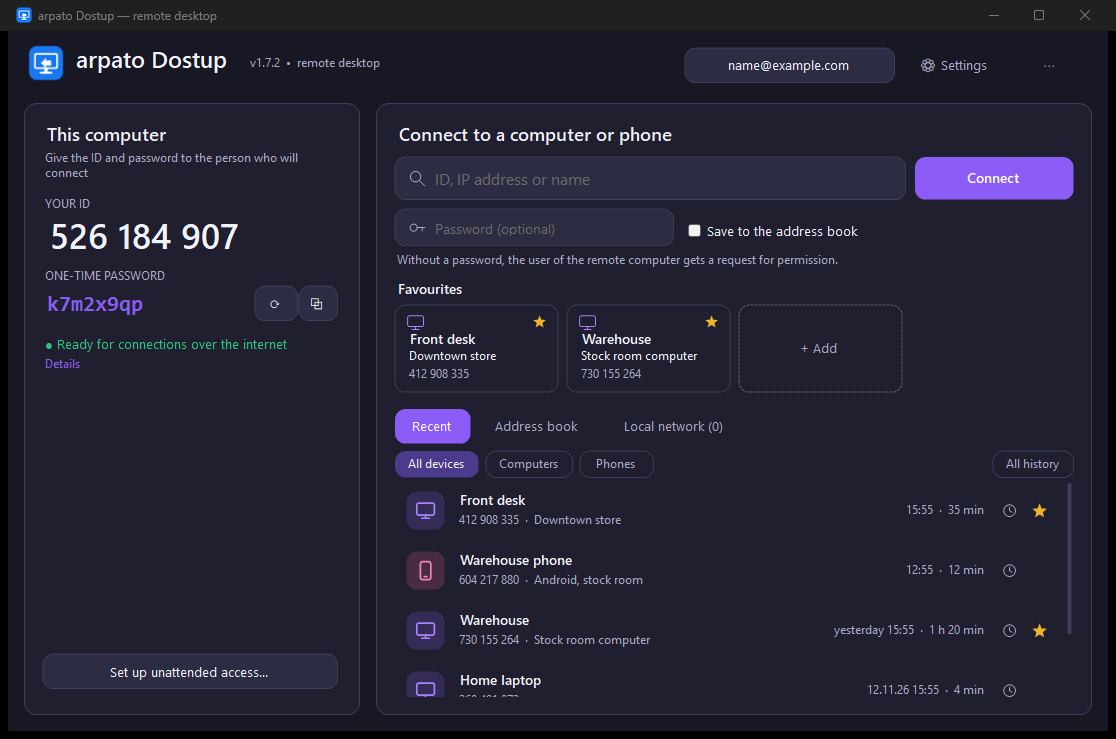
Connect to your computers at any time or help colleagues: they tell you their ID, you connect, they click “Allow”. The connection is encrypted from computer to computer.
Downloads are free, you only need a confirmed e-mail.
Features
Two access modes
A permanent password for your own computers (even the sign-in screen and UAC) and “Allow / Deny” confirmation when helping colleagues.
By ID, IP and on the LAN
First a local network search, then through a relay server. Direct IP connections work too.
Multiple monitors
2–3 monitors — buttons 1, 2, 3 on the toolbar, more — a list. The All button shows every monitor at once. Ctrl+Alt+← / → to switch.
Weak computers and poor networks
Auto mode adjusts the quality by itself and lowers it when the network or one of the computers cannot keep up. The session works even where the picture gets rough. Everything can also be set by hand.
Video for games
Hardware encoding on NVIDIA, AMD and Intel: H.264, HEVC, AV1, up to 240 fps. GPU rendering.
Two mice
Separate mice, a shared one or view only. A pointer shows your colleague where to look without moving their cursor.
Small screens
A 1024×768 till screen is scaled up to your monitor with sharp smoothing; nothing changes on the till.
Sharp text
The session window opens at the size of the remote screen, and the picture lines up pixel for pixel by itself. When scaling, “Sharp scaling” keeps small text crisp.
Protection from impersonation
Dostup remembers the computers you have connected to and will not send the password if another computer answers instead. Someone else trying to guess the password does not keep you out.
Hide from the helper
The person at the computer picks programs and words in window titles — a password manager, a bank, a wallet. Their windows are painted over right on that computer: the helper sees not a single pixel, cannot click in them and does not get passwords copied from them.
A report after the session
When a helper who connected on request has disconnected, you see how long the session lasted, which programs they worked in, which files they transferred and what they ran. Typed text is not recorded.
Sound, clipboard, files, chat
Remote sound, text and images both ways, a file manager with cancellable transfers, chat.
Encryption
ECDH key exchange and AES-256-GCM from client to host. The password never travels over the network.
The connection comes back by itself
If a computer sleeps, hibernates or changes networks, the window stays open and the session continues when the connection returns.
No limit on connections
Open several computers at once, and several viewers can connect to one computer.
Address book in your account
Sign in from the app through your browser, and your list of computers appears on all your computers and in your account. Passwords stay only on your computer.
Favourites and history
Favourites are tiles in the main window, one click to connect. “Recent” lists each device once, and every connection — to whom, when and for how long — is one button away. The description from the address book shows everywhere, so you can tell at once which device it is. With an account, all of it is on all your computers.
Computers and phones
Lists tell computers and phones apart by their icon and can show either one. A window with a phone screen opens at the size of that screen, with no black bars.
15 languages
The app speaks 15 languages and the installer 12. You can change the language right in the settings.
Your own company server
A Windows or Linux server with an access key: your computers work only through it. It only sees an encrypted stream.
Updates arrive by themselves
The app finds a new version, checks its digital signature and installs it when you click.
Your own company server
Put the server on your own computer, a VPS or your local network, and your computers will connect only through it.
Similar apps in our “Top 40 apps of 2026” list
AnyDesk
A lightweight app for connecting to a computer by number, with low latency.
Free for personal useRustDesk
An open-source remote desktop that can run through your own server.
Free, open sourceTeamViewer
One of the best-known remote access services: user support, device management, meetings.
Free for personal useLocalSend
Sends files and text between computers and phones on the same network — like AirDrop, but for every system.
Free, open source